
A Change of State

One of the quieter, but very welcome, improvements in Xcode 27 is a change to how @State is implemented. Although your code looks almost identical, the way SwiftUI initializes state has changed significantly.
In this post, we will investigate the difference between Xcode 26 and Xcode 27, explain why the change was made, and discuss the benefits you get simply by building your app with Xcode 27.
Consider the following code:
import SwiftUI@Observablefinal class DemoModel { let id = UUID() init() { print("DemoModel initialized:", id) }}struct ContentView: View { @State private var refreshCount = 0 @State private var model = DemoModel() var body: some View { VStack { Text("Parent refreshes: \(refreshCount)") .font(.title2) Button("Refresh Parent View") { refreshCount += 1 } .buttonStyle(.borderedProminent) Divider() VStack(spacing: 12) { Text("Child View") .font(.headline) Text(model.id.uuidString) .font(.caption.monospaced()) .multilineTextAlignment(.center) Text("Watch the console") .foregroundStyle(.secondary) } .padding() .background(.thinMaterial, in: .rect(cornerRadius: 12)) } .padding() }}If I execute this code in the preview canvas, when the view loads, the model's id property is used in the child view and it is also printed to the console.
Each time I tap the Refresh Parent View button, only the view enumerating the number of refreshes is updated. There is no reinitialization of the observable model.
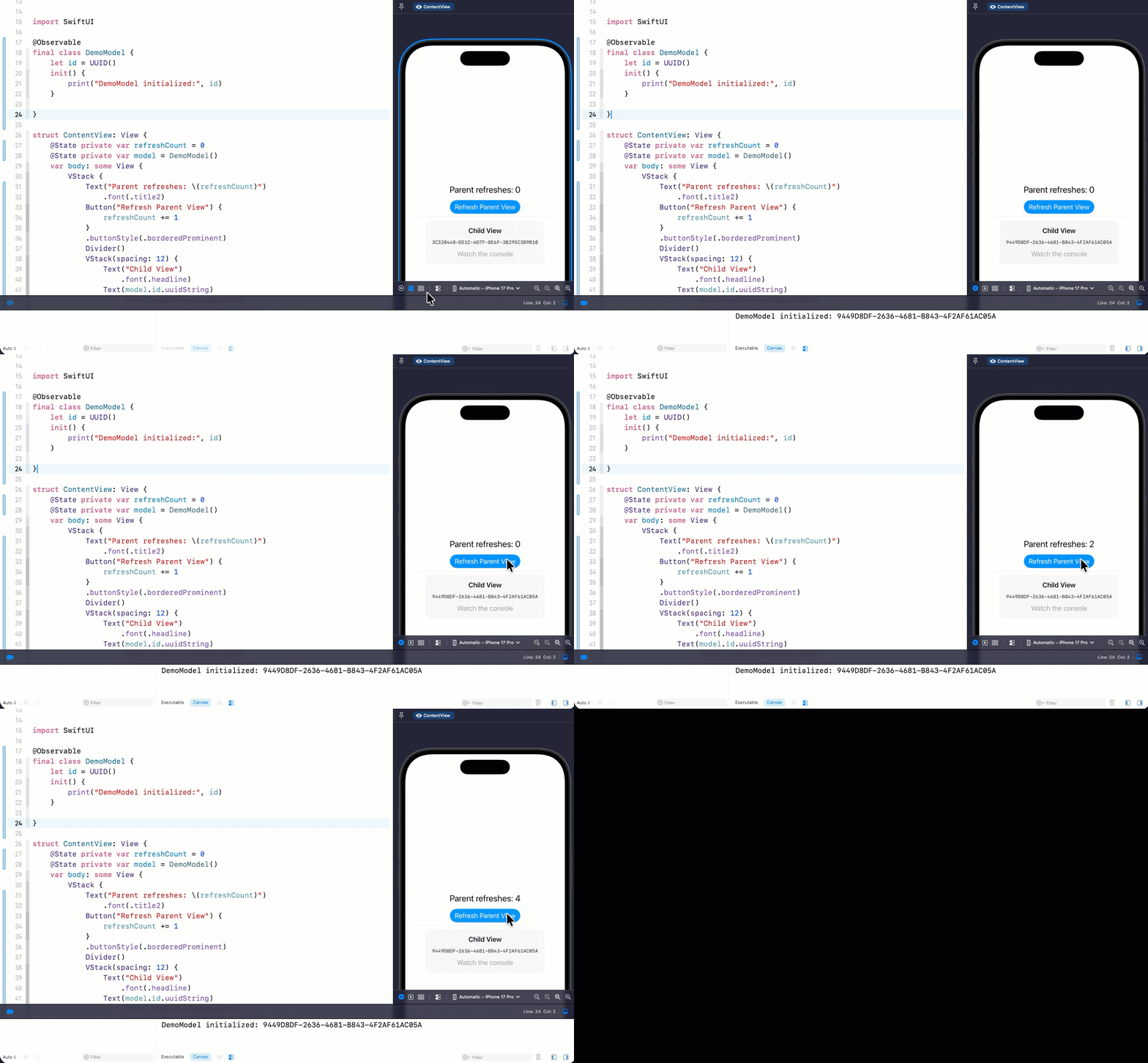
This version works perfectly well. ContentView owns both the refresh counter and the model used by the lower portion of the interface.
Although there is nothing technically wrong with this design, the lower portion of the interface really belongs in its own view.
Refactoring the Child View
Let's extract the lower section into a separate ChildView and initialize the model as a SwiftUI @State property for that view.
struct ChildView: View { @State private var model = DemoModel() var body: some View { VStack(spacing: 12) { Text("Child View") .font(.headline) Text(model.id.uuidString) .font(.caption.monospaced()) .multilineTextAlignment(.center) Text("Watch the console") .foregroundStyle(.secondary) } .padding() .background(.thinMaterial, in: .rect(cornerRadius: 12)) }}Then, in ContentView, remove the model from the parent ContentView then replace the VStack after the Divider with the ChildView.
struct ContentView: View { @State private var refreshCount = 0 // @State private var model = DemoModel() var body: some View { VStack { Text("Parent refreshes: \(refreshCount)") .font(.title2) Button("Refresh Parent View") { refreshCount += 1 } .buttonStyle(.borderedProminent) Divider() ChildView() } .padding() }}This version better reflects how SwiftUI views should own their own state. ContentView owns the refresh counter, while ChildView owns the DemoModel it displays.
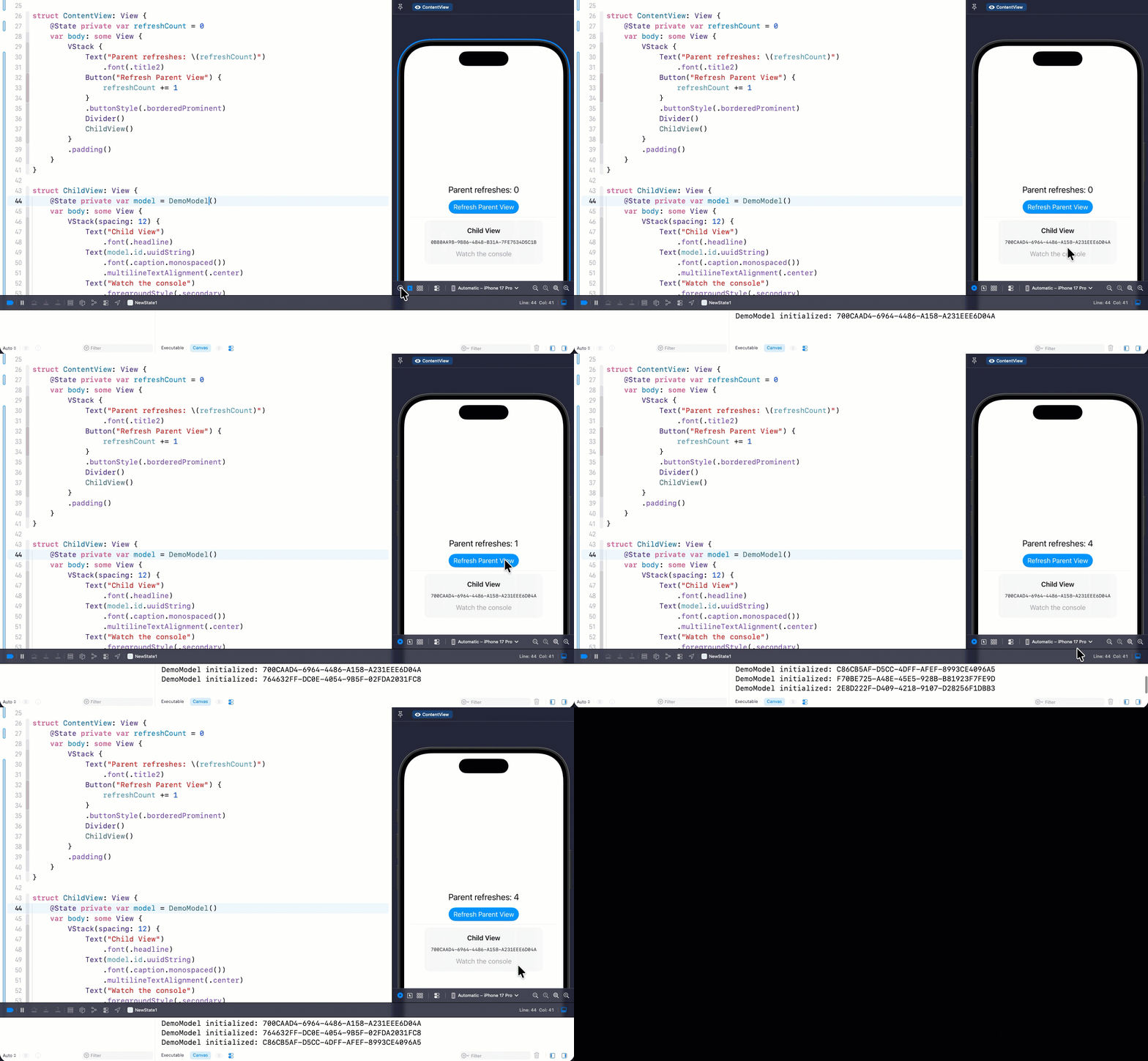
We I execute this in the canvas we see a very different behaviour.
- As before, when I load the view, the model is initialized and the
idis printed to the console and used in the child view presentation. The difference however, is that it is theChildViewthat is doing the initialization and not the parentContentView. - When I tap on the refresh button, the UUID Displayed on the screen never changes.
- The console prints multiple
DemoModel initialized...messages.
The UUID proves that SwiftUI continues to use the original DemoModel stored in @State.
The console tells a different story. Every time the parent view is recreated, the expression DemoModel() is evaluated again, creating additional instances that are immediately discarded.
Same Code, but Xcode 27
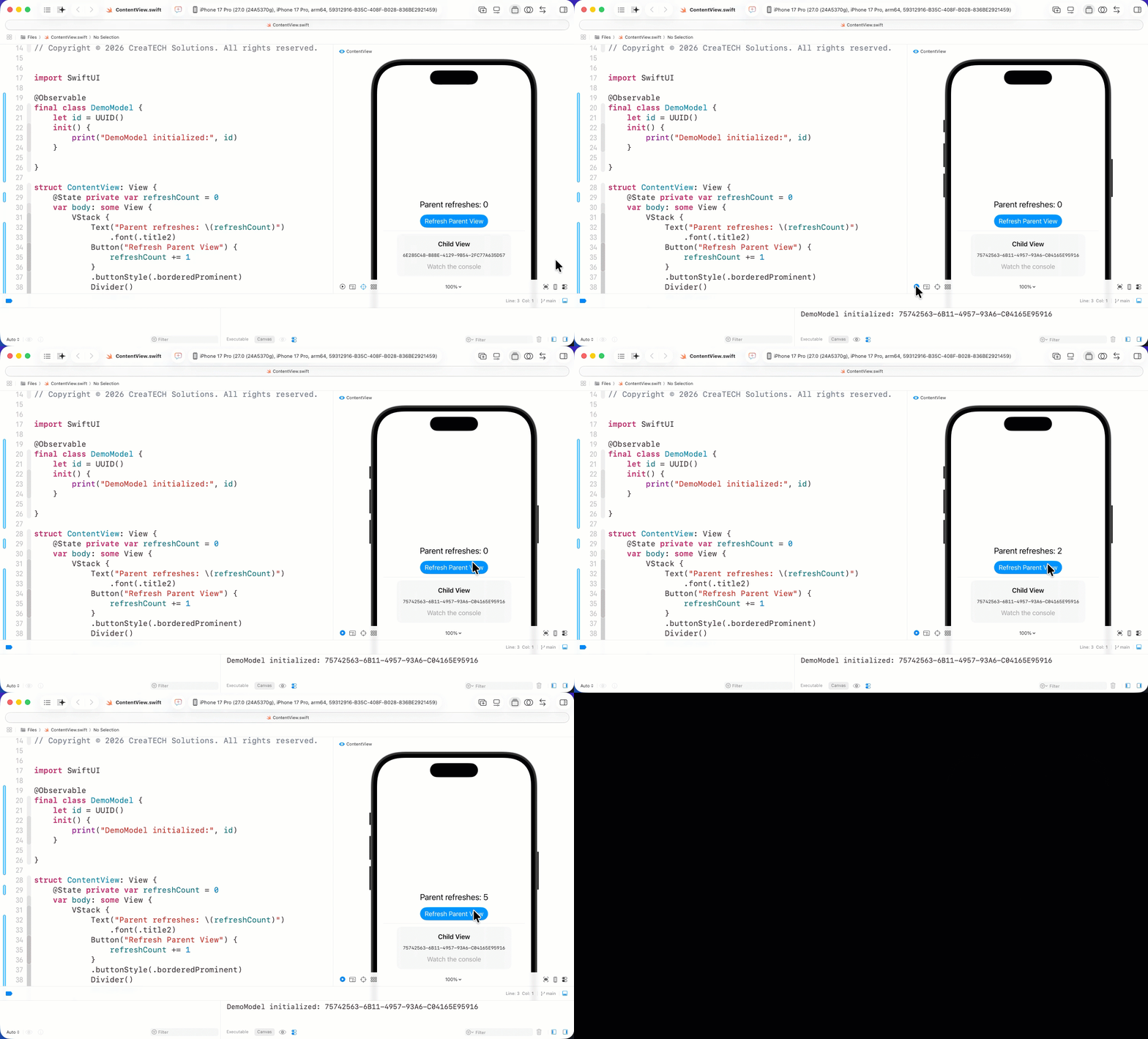
If we open and run this same code in Xcode 27 we get an entirely different result.
The UUID still never changes, but this time the console prints only one initialization message.
What's Changed?
In Xcode 26 and earlier, @State is treated as PropertyWrapper whereas in Xcode 27, it is now a Macro
Every tap increments refreshCount, which causes SwiftUI to recreate the ContentView value.
In Xcode 26, recreating the view also reevaluated this expression:
@State private var model = DemoModel()SwiftUI continued using the existing state storage, but the initialization expression still executed. The newly created object was immediately discarded because SwiftUI already had a stored state value.
The flow looked something like this:
Xcode 26Parent refresh ↓ContentView recreated ↓ChildView recreated ↓DemoModel() called again ↓New DemoModel instance created ↓SwiftUI already has state storage ↓New instance discardedThe important part is that the UUID on screen does not change. SwiftUI is still preserving the original state value. The problem is that extra DemoModel instances are being created along the way and then thrown away.
In Xcode 27, the initialization expression is evaluated lazily when the state storage is first created. Subsequent recreations of the view no longer evaluate DemoModel().
The flow is now much simpler:
Xcode 27Parent refresh ↓ContentView recreated ↓ChildView recreated ↓Existing state storage reused ↓No new DemoModel instance createdFrom your perspective as the developer, the code hasn't changed. The behavior behind the scenes has.
Why This Matters
In this sample, the initializer simply prints a message.
Real applications often do much more inside an initializer. They might:
- Open a database.
- Read files from disk.
- Register for notifications.
- Allocate large amounts of memory.
- Perform expensive calculations.
- Start asynchronous work.
- Create timers or observers.
Under the old implementation, that work could happen repeatedly even though every newly created object was immediately discarded.
The new implementation eliminates that unnecessary work.
The Benefits
The improvement is about more than performance.
Your code now behaves the way it appears to behave.
When you write:
@State private var model = DemoModel()most developers naturally expect DemoModel() to be called exactly once.
That expectation is finally correct.
The benefits include:
- Less unnecessary object creation.
- Better runtime performance.
- Fewer accidental side effects from initializers.
- Reduced memory allocations.
- A simpler mental model for how
@Stateworks.
Perhaps the biggest improvement is that the code is now easier to reason about. The object you initialize is the object SwiftUI keeps.
Should You Change Your Existing Code?
The short answer is no.
If you're already using @State to own an @Observable object, there is nothing you need to rewrite. Your code continues to compile and behave exactly the same from the user's perspective.
What changes is what happens behind the scenes.
When you build your app with Xcode 27, SwiftUI no longer repeatedly evaluates the initialization expression for a @State property whenever the enclosing view is recreated. Instead, the initial value is created lazily when the state storage is first established.
You get the benefits automatically.
That means:
- Existing
@Statecode continues to work. - Fewer unnecessary objects are created.
- Expensive initializers run only when they are actually needed.
- Your app performs less unnecessary work.
- Your code more closely matches your expectations.
As developers, we often get excited about new APIs, new view modifiers, and entirely new frameworks. Sometimes, however, the most valuable improvements are the ones that make existing APIs behave more intuitively.
This is one of those improvements.
You won't need to change a single line of code to benefit from it, but understanding what changed gives you a much better mental model of how @State works in modern SwiftUI.